Normalization module
The normalization module of the SUIT toolbox calculates a deformation field that maps the cerebellum of an individual subject to the SUIT template, using the mask generated by the isolation module. The Python-version uses the ANTSPy package to perform the normalization. The deformation field can then be used to reslice functional and anatomical data into SUIT space.
This notebook shows more detailed usage and options for the normalization module. We assume you have produced an isolation mask (<basename>_cerebellum_dseg.nii.gz) as described in the last step.
[ ]:
# Import necessary packages
from nilearn import plotting as npl
import SUITPy as suit
import nibabel as nib
import matplotlib.pyplot as plt
import os
Basic usage
In the simplest case, normalize function takes the T1-weight image and isolation mask (<basename>_cerebellum_dseg.nii.gz from isolation function) as two parameters:
[2]:
# This function normalizes a source image to the SUIT cerebellar template using a provided cerebellum mask.
results = suit.normalize(source_file = 'sub-ex_T1w.nii.gz',
                 mask_file = 'sub-ex_T1w_cerebellum_dseg.nii.gz',
                 verbose = 1)
Normalizing sub-ex_T1w to tpl-SUIT_T1w.nii.gz
Saving the normalized image into sub-ex_T1w_space-SUIT.nii.gz
Saving deformation field into sub-ex_T1w_to-SUIT_mode-image_xfm.nii.gz
Results is a dictionary that contains the filenames of the saved files.
By default, normalize saves two files:
The deformation field required to reslice images into SUIT space:
<Basename>_to-SUIT_mode-image_xfm.nii.gzThe resliced and masked anatomical in SUIT space:
<Basename>_space-SUIT.nii.gz
Checking the normalization
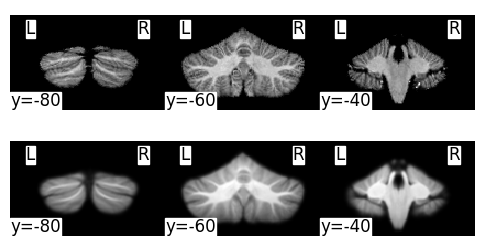
Even though normalization usually works well, it is useful to check the alignment:
[11]:
w_anat_img = nib.load(results['normalized_image'])
template_img = nib.load(os.path.join(os.path.dirname(suit.__file__), 'templates', 'tpl-SUIT_T1w.nii.gz'))
plt.figure(figsize=(6,3))
ax=plt.subplot(2,1,1)
npl.plot_img(w_anat_img,display_mode='y',cut_coords=[-80.0,-60.0,-40.0] , colorbar=False,axes=ax)
ax=plt.subplot(2,1,2)
npl.plot_img(template_img,display_mode='y',cut_coords=[-80.0,-60.0,-40.0] ,colorbar=False,axes=ax)
[11]:
<nilearn.plotting.displays._slicers.YSlicer at 0x1663aded0>
Saving the Jacobian determinant
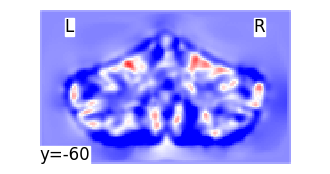
Set write_jacobian_determinant=True to save Jacobian determinant maps. The default output is the geometric Jacobian determinant.
This file is useful for volumetric or VBM analyses. (for more options, see the quickstart_volume documentation).
[ ]:
# Saving the log-Jacobian determinant maps.
results = suit.normalize(source_file = 'sub-ex_T1w.nii.gz',
                 mask_file = 'sub-ex_T1w_cerebellum_dseg.nii.gz',
                 write_log_jacobian_determinant=True,
                 verbose = 0)
[ ]:
# Plot the log-Jacobian determinant maps.
log_jac = nib.load(results['log_jacobian_determinant'])
plt.figure(figsize=(4,2))
npl.plot_img(log_jac,display_mode='y',cut_coords=[-60.0] , colorbar=False, vmin=-1,vmax=1,cmap='bwr',axes=plt.gca())
<nilearn.plotting.displays._slicers.YSlicer at 0x1634bbd60>
Saving the ants transform files
If you are familiar with ANTS and would like to work with the transformation files saved in any format, you can use:
[ ]:
# Set write_ants_transform=True to save the ants transformation files.
results = suit.normalize(source_file = 'sub-ex_T1w.nii.gz',
                 mask_file = 'sub-ex_T1w_cerebellum_dseg.nii.gz',
                 write_ants_transform=True,
                 verbose = 0)
Saving inverse deformation
If you want to bring a group template of atlas into the space of an individual, you need the inverse deformation file. To save that inverse deformation set write_inv_deformation to True.
[ ]:
# Set write_inv_deformation=True to save the inverse transformation file.
results = suit.normalize(source_file = 'sub-ex_T1w.nii.gz',
                 mask_file = 'sub-ex_T1w_cerebellum_dseg.nii.gz',
                 write_inv_deformation=True,
                 verbose = 0)
The inverse deformation is saved as sub-ex_T1w_from-SUIT_mode-image_xfm.nii.gz.
We can then reslice any atlas from SUIT into the individual space.
(for how to use inverse deformation, see the reslice documentation).
Other Template spaces
By default, the image is normalized to the SUIT cerebellar template. For compatibility, the toolbox supports three different cerebellar-only templates
SUIT: The original SUIT template from Diedrichsen (2005).MNI: A cerebellar-only version of theMNI152NLin6Asymtemplate used for example in FSL.MNISym: A cerebellar-only version of theMNI152NLin2009cSymCtemplate for symmetric analyses
[12]:
template_dir      = os.path.join(os.path.dirname(suit.__file__), 'templates')
SUIT_template_img = nib.load(os.path.join(template_dir, 'tpl-SUIT_T1w.nii.gz'))
MNI_template_img  = nib.load(os.path.join(template_dir, 'tpl-MNI152NLin6AsymC_T1w.nii.gz'))
MNISym_template_img = nib.load(os.path.join(template_dir, 'tpl-MNI152NLin2009cSymC_T1w.nii.gz'))

plt.figure(figsize=(10,2))
ax=plt.subplot(1,3,1)
npl.plot_img(SUIT_template_img,display_mode='y',cut_coords=[-60.0],title='SUIT',colorbar=False,axes=ax,annotate=False)
ax=plt.subplot(1,3,2)
npl.plot_img(MNI_template_img,display_mode='y',cut_coords=[-60.0],title='MNI',colorbar=False,axes=ax,annotate=False)
ax=plt.subplot(1,3,3)
npl.plot_img(MNISym_template_img,display_mode='y',cut_coords=[-60.0],title='MNISym',colorbar=False,axes=ax,annotate=False)
[12]:
<nilearn.plotting.displays._slicers.YSlicer at 0x1670b0ca0>
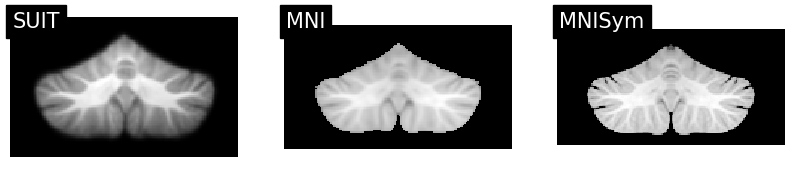
If you want to use a different target space, simply specify the space parameter: SUIT, MNI152NLin6AsymC / ‘MNI’, MNI152NLin2009cSymC / ‘MNISym’.
If you wish to use a custom cerebellum-only template that is not included in these options, you can provide a file directly using the template_file parameter: Optional path to a custom template file.
[ ]:
# This function normalizes a source image to the MNI152NLin2009cSymC space using a provided cerebellum mask.
results = suit.normalize(source_file = 'sub-ex_T1w.nii.gz',
                 mask_file = 'sub-ex_T1w_cerebellum_dseg.nii.gz',
                 space = 'MNISym',
                 verbose = 0)
Transforms between different template spaces
Even though the atlas templates are very close to each other, the normalization will differ ever so slightly.
If you have data in one cerebellar space, and you would like to transform it to another, the Cerebellar Atlas repository contains the deformation files between different atlas spaces.
For example if you have data in SUIT space, and want to transform it to MNISym space:
[13]:
# If you have not downloaded it yet, you need to fetch the xfm files from SUIT to MNISym space from cerebellar atlas repository first
import urllib.request
import os
url = ("https://raw.githubusercontent.com/DiedrichsenLab/cerebellar_atlases/master/tpl-MNI152NLin2009cSymC/tpl-MNI152NLin2009cSymC_from-SUIT_mode-image_xfm.nii")
xfm_file = "tpl-MNI152NLin2009cSymC_from-SUIT_mode-image_xfm.nii"
urllib.request.urlretrieve(url, xfm_file)
[13]:
('tpl-MNI152NLin2009cSymC_from-SUIT_mode-image_xfm.nii',
 <http.client.HTTPMessage at 0x1667c3760>)
[14]:
# then reslice the SUIT-space image to MNISym space
xfm_file = "tpl-MNI152NLin2009cSymC_from-SUIT_mode-image_xfm.nii"
output_img = suit.reslice_image(source_image = 'sub-ex_T1w_space-SUIT.nii.gz',
        deformation = xfm_file)